How to extract creator videos for repurposing

How to extract creator videos for repurposing
Manually pulling clips from long-form creator videos, reformatting them for TikTok, Instagram Reels, and YouTube Shorts, then generating transcripts and captions is exactly as painful as it sounds. For AI video tool developers and product managers, the need to extract creator videos for repurposing at scale makes manual workflows a non-starter. The good news: AI-powered extraction services have matured to the point where a single API call can replace hours of editing work. This guide walks you through preparation, extraction workflows, challenge mitigation, and output validation so you can build pipelines that actually hold up in production.
Table of Contents
- What you need before extracting creator videos
- How to extract video clips and assets for multi-platform repurposing
- Handling technical and legal challenges in video extraction
- Validating and optimizing extracted content for repurposing workflows
- Why many extraction services fall short and how to build better repurposing pipelines
- Explore Tornado API for robust video extraction and repurposing
- Frequently asked questions
Key Takeaways
| Point | Details |
|---|---|
| Compliant extraction required | Always extract videos you have rights to use to comply with platform and copyright rules. |
| AI automates clip selection | AI uses audio, speech, and visual cues to identify high-engagement segments for repurposing clips. |
| Multi-format output essential | Export clips in vertical, square, and landscape formats to support TikTok, Instagram, and YouTube platforms. |
| Client-side extraction benefits | Extracting frames and audio locally boosts privacy and reduces server costs in repurposing workflows. |
| Validate and edit outputs | Review AI-generated clips and transcripts to ensure quality before publishing or integration. |
What you need before extracting creator videos
Before writing a single line of extraction code, you need three things locked down: rights, formats, and tooling. Skip any one of them and you will spend more time debugging legal issues or format errors than building features.
Rights and authorization come first. The legal landscape around video extraction is not ambiguous. You should offer compliant extraction only for videos with user rights or authorization to repurpose. That means your own content, videos under a Creative Commons license, or content where the creator has explicitly granted repurposing rights. Building a product that lets users paste any URL and extract clips without rights verification is not a gray area. It is a liability.
Know your input formats. Most creator videos arrive as MP4, MOV, or WebM. Upload-based tools typically cap file sizes around 2 GB, which covers most single-episode podcast recordings and long-form YouTube videos. If your pipeline ingests directly from platform URLs, format normalization becomes the tool's problem, not yours. That is a meaningful architectural advantage worth factoring into your extraction API selection.
Choose tools that accept both URLs and direct uploads. URL-based ingestion is faster for platform content; direct upload support matters for privately hosted or client-supplied files. The best video extraction tools handle both without requiring you to build separate ingestion paths.
Here is a quick reference for common input requirements:
| Input type | Common formats | Typical size limit | Best for |
|---|---|---|---|
| Direct upload | MP4, MOV, WebM | Up to 2 GB | Private or client files |
| Platform URL | Auto-detected | No file size limit | YouTube, TikTok, Instagram |
| Cloud storage link | MP4, WebM | Varies by provider | Large-scale batch ingestion |
What you need at a minimum:
- Confirmed rights or authorization for each video source
- Input format compatibility verified against your tool's specs
- A tool or API that handles multi-format output (vertical 9:16, square 1:1, landscape 16:9)
- Transcript generation capability built into the extraction step, not bolted on later
Pro Tip: If you are building for AI training datasets, check whether your extraction service supports direct cloud delivery to S3, R2, or GCS. Pulling files through your own servers before pushing to storage adds latency and cost that compounds fast at scale. The AI training datasets guide covers this in detail.
How to extract video clips and assets for multi-platform repurposing
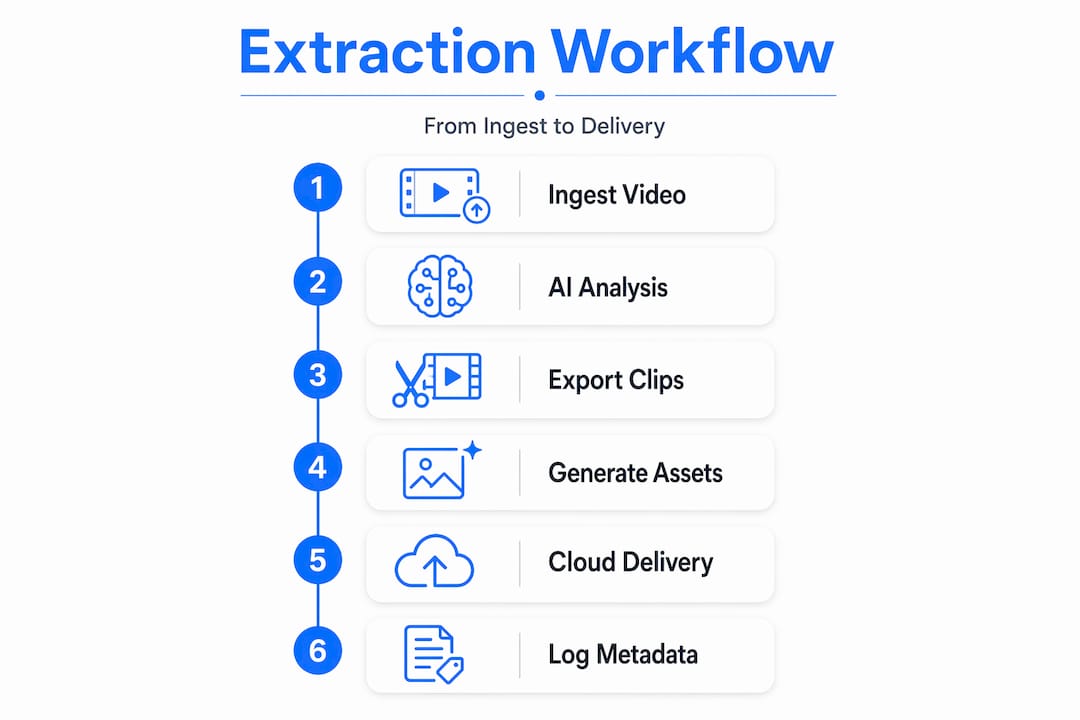
With inputs and tooling ready, here is how a production-grade extraction workflow actually runs, step by step.
1. Ingest the source video. Upload the file directly or pass an authorized platform URL to your extraction service. URL-based ingestion is preferable for platform content because it avoids the bandwidth cost of downloading and re-uploading. Your extraction tool should handle authentication and anti-bot handling transparently.
2. Run AI analysis on the full video. AI clip extraction uses audio energy, speech patterns, and scene changes to identify 15 to 60 second clips optimized for TikTok, Instagram Reels, and YouTube Shorts. The model scores each segment for engagement potential, not just cuts at arbitrary intervals. This is the step that separates real repurposing tools from basic video trimmers.
3. Select and export clips in multiple formats simultaneously. A single source video should produce vertical (9:16), square (1:1), and landscape (16:9) exports in one pass. Running separate export jobs for each format is inefficient and inconsistent. Your content repurposing API should handle this natively.
4. Generate transcripts, summaries, and quote assets alongside clips. One video can become dozens of clips, transcripts, summaries, and quotes with multi-format exports. This matters because the transcript is the foundation for captions, blog posts, newsletters, and social copy. Treating it as an afterthought means rebuilding work later.

5. Deliver outputs to your storage or publishing pipeline. Direct cloud delivery to S3, R2, GCS, or Azure eliminates a manual handoff step. If your extraction service does not support this natively, you are adding engineering overhead that scales poorly.
6. Log metadata for each extracted clip. Clip start and end timestamps, source video ID, format specs, and transcript segment references should all be stored. This metadata powers downstream features like search, tagging, and content auditing.
Here is how AI-assisted extraction compares to manual clip editing:
| Capability | Manual editing | AI extraction service |
|---|---|---|
| Time per 60-min video | 3 to 6 hours | Under 10 minutes |
| Multi-format export | Separate renders required | Single-pass output |
| Transcript generation | Separate tool needed | Integrated |
| Engagement scoring | Editor judgment only | AI-scored segments |
| Batch processing | Not practical | Fully supported |
Pro Tip: Build your n8n or automation workflow to trigger extraction jobs on new video uploads rather than running them manually. Even a simple webhook-to-API chain cuts response time from hours to minutes and removes the human bottleneck entirely.
Handling technical and legal challenges in video extraction
Understanding the workflow is one thing. Keeping it running reliably under real production conditions is another problem entirely.
Bot detection is the most common extraction failure point. Extraction reliability issues arise from bot detection, authentication states, and IP reputation. Cookie-based sessions help mitigate these problems, but they require active management. Proxy rotation and anti-bot handling need to be built into your extraction infrastructure, not treated as edge cases. If your service does not handle this transparently, you will spend engineering time on infrastructure instead of product features.
Authentication-gated content requires session management. Private videos, member-only content, and age-restricted material all require authenticated sessions to extract. This is a meaningful technical barrier for teams building general-purpose repurposing tools. The practical answer is to scope your tool to publicly available, authorized content and build clear user flows for rights verification.
Copyright compliance is not optional. Extraction services should offer only authorized content workflows to comply with platform terms of service and copyright law. This is not just a legal requirement. It is a product stability requirement. Platforms actively update their detection systems, and tools that rely on unauthorized extraction face constant breakage.
Building on authorized content workflows is not a constraint. It is the foundation that makes your extraction service reliable enough to sell.
Client-side frame and audio extraction reduces privacy exposure. When extraction happens on the user's device rather than your servers, you never touch the raw video file. This matters for enterprise customers with data residency requirements and for any workflow involving proprietary or sensitive content.
Key mitigation strategies:
- Use extraction services with built-in proxy rotation and anti-bot handling
- Scope ingestion to authorized and rights-verified content only
- Implement session management for authenticated content where permitted
- Review your tool's acceptable use policy before enabling URL-based extraction for end users
- Log all extraction requests with source, timestamp, and rights verification status
Pro Tip: If you are building a multi-tenant SaaS product, rights verification should happen at the user account level, not just at the API call level. Store authorization proof alongside each extraction job so you have an audit trail if a content dispute arises.
Validating and optimizing extracted content for repurposing workflows
Extraction is not done when the clip file lands in your storage bucket. Quality validation is where most teams underinvest, and it shows in the output.
1. Review clips for meaningful context and proper framing. AI scoring is good but not perfect. A clip that scores high on audio energy might start mid-sentence or end before the punchline. Build a review step, even a lightweight one, into your pipeline before clips reach end users or publishing queues.
2. Verify transcript accuracy. Transcripts with over 95% accuracy and speaker recognition enable effective repurposing into blog posts, newsletters, and educational formats. Strong accuracy is achievable, but accents, technical vocabulary, and multi-speaker conversations still introduce errors. Edit transcripts before using them as captions or written content.
3. Check format exports against platform specifications. Vertical video for TikTok and Reels needs to be true 9:16 at 1080x1920. Square exports for Instagram feed posts need 1:1 at 1080x1080. A clip that is slightly off-spec will either get rejected or display incorrectly. Automate spec validation as part of your export pipeline.
4. Implement caption timing and speaker centering checks. Auto-generated captions that drift out of sync by even half a second are noticeably bad. Speaker centering in vertical video matters because a face cut off at the edge of the frame looks unprofessional regardless of how good the content is.
Here is a validation checklist for extracted content:
| Validation check | What to look for | Tool or method |
|---|---|---|
| Clip duration | 15 to 60 seconds for short-form | Automated metadata check |
| Transcript accuracy | Under 5% word error rate | Manual spot-check or AI review |
| Format spec compliance | Resolution and aspect ratio match | Automated spec validation |
| Caption sync | Under 0.3 second drift | Playback QA |
| Speaker framing | Face centered in vertical crops | Visual review or AI face detection |
Pro Tip: For high-volume extraction pipelines, build a sampling-based QA process rather than reviewing every clip manually. Check 5 to 10 percent of output at random and flag jobs that fall below your quality threshold for full review. This keeps QA costs manageable without sacrificing output standards.
Why many extraction services fall short and how to build better repurposing pipelines
Here is the uncomfortable reality: most tools marketed as "video repurposing" platforms are glorified video trimmers with an AI label attached. They cut at scene changes or silence gaps and call it clip extraction. That is not engagement scoring. It is pattern matching dressed up in marketing language.
The products that actually work treat extraction as a multi-stage pipeline problem. Stage one is reliable ingestion, which means anti-bot handling, proxy rotation, and format normalization handled at the infrastructure level, not the application level. Stage two is AI scoring that weighs audio energy, speech density, sentiment, and visual change together, not independently. Stage three is output normalization across formats, with consistent framing, caption timing, and metadata. Most services nail one of these stages and paper over the other two.
The teams building the best repurposing tools are also the ones who have thought carefully about rights management. Not because they are especially cautious, but because authorized ingestion pipelines are simply more reliable. Platforms actively work to block unauthorized extraction. Building on authorized workflows means your extraction success rate stays high without constant infrastructure firefighting.
Client-side extraction is underused and underrated. When your tool processes frames and audio on the user's device, you reduce server load, eliminate data transfer costs for large files, and sidestep data residency concerns entirely. For enterprise customers, that last point alone can be the difference between a signed contract and a failed security review.
The other gap most teams miss is the connection between transcripts and downstream repurposing. A transcript is not just a caption source. It is the raw material for blog posts, email newsletters, quote graphics, and search indexing. Building transcript generation into the extraction step rather than treating it as a separate feature means your users get more value from every clip without additional API calls or workflow complexity. The AI training datasets guide covers how transcript quality affects downstream model training, which is relevant if your customers include AI labs or transcription SaaS platforms.
The teams that win in this space are not the ones with the most features. They are the ones with the most consistent output quality across every stage of the pipeline.
Explore Tornado API for robust video extraction and repurposing
For teams ready to move past stitched-together extraction scripts and into a production-grade pipeline, TornadoAPI is built specifically for this problem. Delivering 300 TB per month at 99.998% extraction reliability, it sits between YouTube, Instagram, TikTok, Spotify, and your ingestion stack so your team writes one API call and gets the file.
Anti-bot handling, proxy rotation, format normalization, and direct delivery to S3, R2, GCS, or Azure are all handled at the infrastructure level. You get a YouTube download API for video clipping that is purpose-built for repurposing workflows, not a general-purpose scraping toolbox. Review the Tornado API pricing plans to find the right fit for your extraction volume, and check the acceptable use policy to understand how rights-compliant ingestion is enforced at the platform level. If you want to talk infrastructure directly, book a 30-minute call at cal.com/velys/30min.
Frequently asked questions
Can I extract clips from any YouTube video for repurposing?
You can only extract clips from videos you own, have authorization to use, or that are licensed under Creative Commons, since unauthorized downloading violates platform terms of service and copyright law.
What video formats do extraction tools typically support?
Most AI extraction tools support MP4, MOV, and WebM formats, which cover the majority of creator video uploads across major platforms.
How accurate are AI-generated transcripts from videos?
Automatic transcription now achieves over 95% accuracy with speaker and language recognition, making transcripts reliable enough to repurpose directly into written content with light editing.
How does AI decide which clips to extract from a long video?
AI analyzes audio energy and speech patterns alongside scene changes to score engagement and select 15 to 60 second segments optimized for short-form platforms like TikTok, Reels, and YouTube Shorts.