Podcast video extraction: a developer's guide

Podcast video extraction: a developer's guide
Most developers assume that pulling audio from a video podcast file means running it through an encoder and accepting some quality loss. That assumption is wrong, and it costs platforms real money in unnecessary compute. What is podcast video extraction, really? It is the process of separating audio and video streams from a media container, and when done correctly, it can be entirely lossless. This guide covers the core operations behind extraction, how modern platforms wire it into multi-format distribution, and the codec-aware decisions that separate efficient pipelines from wasteful ones.
Table of Contents
- Understanding podcast video extraction and its core operations
- How podcast platforms integrate video extraction into multi-format distribution
- The new paradigm: HLS video streaming and alternate enclosures in podcast RSS feeds
- Making codec decisions: remux vs transcode for lossless audio extraction
- Common pitfalls and practical tips for efficient podcast video extraction workflows
- Why treating podcast video extraction as a codec-aware decision tree transforms platform efficiency
- Explore Tornado API for scalable podcast video extraction solutions
- Frequently asked questions
Key Takeaways
| Point | Details |
|---|---|
| Podcast video extraction defined | It involves pulling audio and video streams from media containers, usually by demuxing without re-encoding to preserve quality. |
| HLS streaming is key | HTTP Live Streaming allows adaptive, segment-based video streaming inside podcast RSS feeds, improving user experience. |
| Codec-aware extraction | Smart pipelines inspect codecs to decide if remuxing is possible, avoiding unnecessary re-encoding and quality loss. |
| Audio-first approach | Maintaining an audio-first RSS feed while adding video as an alternate enclosure avoids audience disruption. |
| Use scalable APIs | Platforms benefit from scalable extraction APIs like Tornado API that simplify extraction workflows at production scale. |
Understanding podcast video extraction and its core operations
To grasp the value of extraction, let's first clarify the core media operations behind it.
A video file is not a single stream of data. It is a container (formats like MP4, MKV, or MOV) that holds separate elementary streams: video, audio, subtitles, and metadata. Extraction means pulling one or more of those streams out of the container. How you do that determines whether you lose quality or not.
Three operations matter here:
- Demuxing: Separating elementary streams from a container without touching the encoded data. No re-encoding happens. The audio bytes come out exactly as they went in.
- Remuxing: Taking extracted streams and packaging them into a new container format, again without re-encoding. Lossless, as long as the target container supports the source codec.
- Transcoding: Decoding the stream and re-encoding it into a different codec or bitrate. This is the only operation that can reduce quality, and it is also the most expensive in compute time.
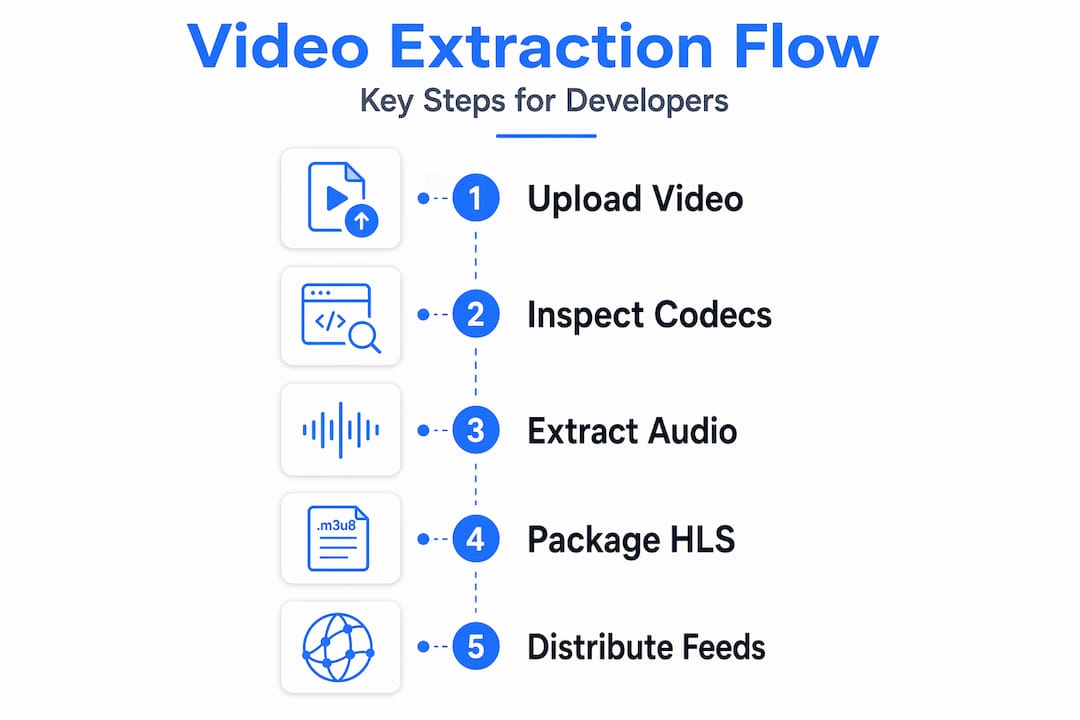
In the context of podcast platforms, podcast video extraction typically means separating the audio stream from a recorded video file so it can be used in an audio RSS feed. That is demuxing, not transcoding. The distinction matters enormously when you are processing hundreds of episodes per day.
Your choice of operation directly impacts three variables: output quality, processing latency, and infrastructure cost. Transcoding a 90-minute episode can take minutes on a standard server. Remuxing the same file takes seconds. For platforms running at scale, that gap is not trivial.
How podcast platforms integrate video extraction into multi-format distribution
With the technical basics clear, let's explore how platforms implement extraction in practice.
The core idea behind modern video podcast creation is "upload once, distribute everywhere." A creator records a video session, uploads a single file, and the platform handles the rest. That means the platform needs to:
- Receive the original video file (typically MP4 with H.264 video and AAC audio).
- Extract the audio track via demuxing for the traditional RSS feed.
- Prepare the video in a streaming-compatible format (usually HLS) for video-capable platforms.
- Publish both outputs simultaneously without requiring a second upload or a separate feed.
Podigee processes a single video upload by extracting audio for RSS and preparing video deliverables for platforms including YouTube and Apple Podcasts. That single-upload model is the right architecture. It removes the creator's burden entirely and keeps the platform in control of format normalization.
The audio-first RSS feed is not optional here. It is the distribution backbone. Millions of listeners use apps that do not support video at all. Breaking that feed to add video support would fragment your audience immediately.
Pro Tip: Build your extraction pipeline so the audio track is always the first artifact produced. If the video processing step fails or times out, your RSS feed still publishes on schedule. Decoupling the two outputs protects your audio audience from video pipeline failures.
The benefits of podcast video in this architecture are real: creators get simultaneous reach across audio-only apps, video platforms, and emerging video podcast players without any extra work on their end. For platform teams, it means one ingestion point and deterministic output, which is far easier to monitor and debug than parallel upload workflows. You can learn more about handling video clipping from live recordings in similar multi-output pipeline designs.
The new paradigm: HLS video streaming and alternate enclosures in podcast RSS feeds
Now that we understand traditional workflows, let's dive into the modern streaming standard transforming video podcast extraction and delivery.
Traditional video podcasts have a real problem: video files are large. A 60-minute episode at 1080p can easily exceed 2 GB. Requiring listeners to download that file before watching is a bad experience, and hosting costs compound fast at scale.
HLS (HTTP Live Streaming) solves this by breaking video into small segments, typically 6 to 10 seconds each, with a manifest file that points to them. The player fetches only what it needs, adapts the quality based on available bandwidth, and the user never waits for a full download. That is adaptive bitrate streaming, and it is the standard used by every major video platform.
The Podcast Standards Project proposes using "podcast:alternateEnclosure` with HLS manifests to combine audio and adaptive bitrate video in a single RSS feed, maintaining compatibility and improving the listener experience. This is a significant architectural shift.
Here is what that means in practice:
- One RSS feed contains both the audio enclosure (for legacy apps) and an alternate enclosure pointing to an HLS manifest (for video-capable apps).
- Audio-only podcast apps ignore the alternate enclosure entirely and keep working as before.
- Video-capable players read the HLS manifest and stream video adaptively.
"This approach lets existing audio podcast apps continue unchanged while video-supporting apps stream adaptive bitrate video segments."
| Feature | Traditional video feed | HLS with alternate enclosure |
|---|---|---|
| File size for listener | Full video download required | Segments streamed on demand |
| Backward compatibility | Separate feed needed | Single feed, apps ignore unknown tags |
| Bandwidth adaptation | None | Automatic quality adjustment |
| Storage cost | High (full video files) | Lower (segments, often CDN-cached) |
| Player support | Limited | Growing, especially in newer apps |
For platform engineers, this means your extraction pipeline needs to produce an HLS package (segmented .ts or .fmp4 files plus an .m3u8 manifest) in addition to the audio track. That is more work upfront, but the best YouTube extraction APIs in 2026 already handle format normalization at this level, which gives you a useful reference point for what production-grade output looks like.

Making codec decisions: remux vs transcode for lossless audio extraction
Having explored streaming standards, it is crucial to understand how codec choices impact extraction quality and efficiency.
The single most important rule in podcast video editing and audio extraction is this: inspect before you act. You cannot make a good extraction decision without knowing what is inside the container. A file named .mp4 could contain AAC audio, MP3 audio, or even Opus. Assuming the codec without checking leads to either failed remuxes or unnecessary transcodes.
Here is the decision process:
- Inspect the source container: Use a tool like FFprobe to read the audio codec, bitrate, sample rate, and channel count before touching the file.
- Check target format compatibility: If you are extracting to M4A and the source audio is AAC, remux directly. AAC in MP4 to M4A is a container swap, not a re-encode.
- Remux when codecs match: Extracting AAC audio from MP4 to M4A can be lossless by remuxing without re-encoding, avoiding quality loss and saving processing time.
- Transcode only when necessary: If the source audio is in a codec the target platform does not support (for example, Opus in an MP4 going to a platform that requires AAC), then transcode. Accept the cost, but do it deliberately.
- Log every decision: In a production pipeline, knowing whether a given file was remuxed or transcoded is essential for debugging quality complaints.
Pro Tip: Store the codec inspection result as metadata on the job before processing starts. If a file fails mid-pipeline, you know exactly which branch it took and can replay it without re-inspecting. This also gives you aggregate data on what codecs your creators are actually uploading, which informs future format policy decisions.
The cost difference is not academic. On a platform processing 10,000 episodes per month, replacing unnecessary transcodes with remuxes can cut audio processing compute by 60 to 80 percent. That is real infrastructure savings. For teams building video extraction pipelines for Whisper transcription, the same logic applies: extract audio losslessly first, then feed it to the transcription model.
Common pitfalls and practical tips for efficient podcast video extraction workflows
Now that you know the theory and the tech, here are the practical steps to avoid common mistakes and get your extraction workflow right.
- Keep a single RSS feed. Splitting into separate audio and video feeds fragments your subscriber count and breaks analytics. An effective video upgrade maintains the audio-first RSS feed to avoid disrupting existing listeners, adding video as an additional, non-intrusive layer.
- Use HLS alternate enclosure for video. Do not publish raw MP4 video files as enclosures in RSS. Use the
podcast:alternateEnclosuretag with an HLS manifest. Your audio audience is unaffected, and your video audience gets adaptive streaming. - Never re-encode without a reason. Every transcode is a quality decision, not just a format decision. Document why a transcode was necessary and what quality settings were used.
- Carry metadata through every output. Chapter markers, transcripts, and episode descriptions should be present in both the audio and video outputs. Dropping metadata during extraction is a common oversight that creates downstream problems in search indexing and accessibility.
- Automate codec inspection. Build the FFprobe step into your ingestion queue. Every file gets inspected before it enters the processing branch. The pipeline then routes to remux or transcode based on the result, not based on assumptions.
Pro Tip: Run a weekly audit on your pipeline's transcode-to-remux ratio. If that ratio is climbing, it usually means creators are uploading in formats your pipeline was not designed for. That is a signal to update your ingest spec or add a normalization step at the front of the queue. You can find deeper discussion of these patterns on the TornadoAPI blog and in the best Spotify podcast downloader API guides for 2026.
Why treating podcast video extraction as a codec-aware decision tree transforms platform efficiency
Having covered best practices, let's explore a deeper view that few platforms fully embrace.
Most teams think of extraction as a single tool task. You run a command, you get a file. That framing works fine for a solo developer processing one episode. It breaks down completely at platform scale, where the source material is heterogeneous, the output requirements vary by destination, and the cost of getting it wrong compounds across thousands of jobs per day.
The better mental model is a decision tree. In an automated pipeline, treat extraction as a codec-aware decision process: inspect the audio codec, then decide on remux or transcode to optimize latency and quality. That is not a new idea in video engineering, but it is surprisingly rare in podcast platform implementations, where "just run FFmpeg" is still the dominant approach.
Here is what that shift actually produces. A platform that inspects codecs before processing does not just save compute. It produces consistent output quality, because every transcode is intentional and parameterized. It surfaces format anomalies early, because the inspection step catches malformed files before they enter the processing queue. And it gives product teams real data on creator behavior, which informs decisions about supported formats and encoding recommendations.
The metadata continuity point deserves more attention than it gets. When you extract audio from a video file, you are not just moving bytes. You are creating a new artifact that needs to carry the same chapter markers, embedded transcripts, and ID3 tags as the original. Platforms that treat extraction as a pure format operation and ignore metadata end up with audio feeds that are technically correct but functionally degraded. Listeners lose chapter navigation. Transcription services get files without timing anchors. Search indexing suffers.
Treating extraction as a video clipping and delivery infrastructure problem, rather than a simple conversion task, is the architectural decision that separates platforms built to scale from those that will be refactoring their pipelines in 18 months.
Explore Tornado API for scalable podcast video extraction solutions
To apply these insights effectively, consider what production-grade extraction infrastructure actually looks like in practice.
TornadoAPI is built specifically for teams that need reliable, high-volume video extraction without managing the underlying complexity. One API call returns the file: audio extraction, format normalization, and direct delivery to your S3, R2, GCS, or Azure bucket. Anti-bot handling and proxy rotation are handled at the infrastructure level, not in your codebase.
At 300 TB delivered per month with 99.998% extraction reliability and 50 Gbps capacity, TornadoAPI is built for the scale podcast and AI video platforms actually operate at. The pricing tiers cover everything from early-stage products to enterprise ingestion pipelines, and the video clipping and delivery solutions map directly to the multi-format distribution workflows covered in this guide. If your team is evaluating extraction infrastructure, a 30-minute infra-to-infra call at cal.com/velys/30min is the fastest way to get to a real answer.
Frequently asked questions
What does podcast video extraction mean?
It is the process of separating audio and video streams from media files. As AudioUtils explains, podcast video extraction typically means demuxing the audio stream from a recorded video file for use in an audio RSS feed, often without any quality loss.
How does HLS improve video podcast delivery?
HLS breaks video into small segments for adaptive streaming, so listeners never download the full file. The Podcast Standards Project's HLS demo shows how this reduces bandwidth requirements while allowing seamless quality adjustment based on available connection speed.
Why avoid re-encoding audio during extraction?
Re-encoding degrades audio quality and increases processing time significantly. When source and target codecs match, remuxing copies audio bytes without re-encoding, preserving original quality and cutting workflow latency.
Can I publish video and audio in one podcast RSS feed?
Yes. The podcast:alternateEnclosure tag allows a single RSS feed to carry both an audio enclosure for legacy apps and an HLS video stream for video-capable players, with no disruption to existing subscribers.
What workflow does Podigee use for video podcasts?
Podigee extracts audio and prepares video from a single uploaded file, distributing the audio track to classic podcast apps via RSS while sending video to platforms like YouTube and Apple Podcasts simultaneously.